
Part of what makes short-form writing so tricky is that the context for the different platforms that it can appear on is different. Writing in the short form about something written in the long-form makes it even more complex.
I wrote three short-form pieces, one for Twitter, one for LinkedIn, and one for Instagram as teasers for my long-form article “Web Accessibility: What It Is & Why It Matters.”
I found that Twitter was the most challenging platform to write for because of the 280-character limit. Having so little room to work with made writing an engaging lead while squeezing in some facts and a link very difficult. I combated this by starting with a question that would make people want to read more. I used bit.ly to shorten the link to my article to give myself more leeway with the character limit. The post came to 223 characters (including spaces and the link).
Next, I approached LinkedIn. The platform’s primary purpose is business networking, so I wanted to write something more formal, almost like a news report. The character limit is 3,000, so I didn’t have to worry about the length of my content. I made sure to keep my post short because no one will stop to read it if it is too long. I used what I wrote for Twitter as the basis of the LinkedIn post and added some more details, and decided to remove the question because it seemed too casual.

The final platform I wrote for was Instagram which is less news centered than Twitter and less formal than LinkedIn, giving me the most creative freedom. Instagram is more focused on photos than text, so I wanted to ensure the caption was highly engaging. I did so by using a surprising statistic forcing the audience to read the article and learn more. The last sentence, “Learn more by clicking the link in my bio,” is my least favorite, but Instagram doesn’t let you hyperlink in posts, so it is the most realistic solution. I also added relevant words hashtags to Instagram to increase the post’s reach.
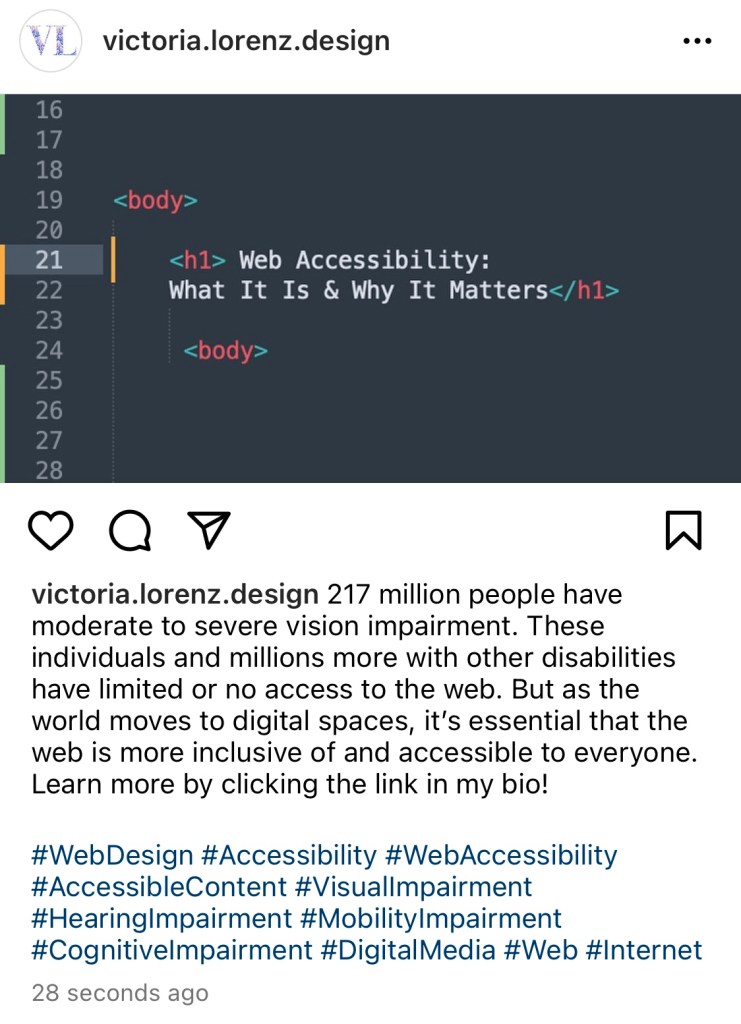
All three pieces focus on the topic from the same or similar point of view, making them cohesive across platforms. I decided to use the cover photo of my long-form article for all of them to keep it consistent. I made the image myself by typing the title of my article “Accessible Web Design: What It Is & Why It Matters” into Sublime, a coding program. This image is compelling on social media because it shares the article’s title without including it in the caption. When users see a picture before clicking on a link, they subconsciously expect to be greeted by the same image in the new window. Matching the cover image on social media will ensure the user knows they have been redirected to the right place.
 Victoria Lorenz